 Speed Patterns


Progress Indication
When work takes long enough that the user notices, "nothing visible is happening" stops being acceptable. Some form of progress indication is required — but the choice of which form has a much bigger impact on the experience than teams often realize.
The Problem
A page or interaction that takes more than about a second to complete needs to communicate its progress to the user. Without that communication:
- The user assumes the page is broken and reloads, navigates away, or rage-clicks
- Repeated submissions and duplicate actions become common
- Trust in the site erodes even when the operation eventually succeeds
But not all forms of progress indication are equal. The default reach for a generic spinner — circular, infinite, decoupled from the actual work — communicates almost nothing useful. Choosing the right form is itself a design decision.
Solution
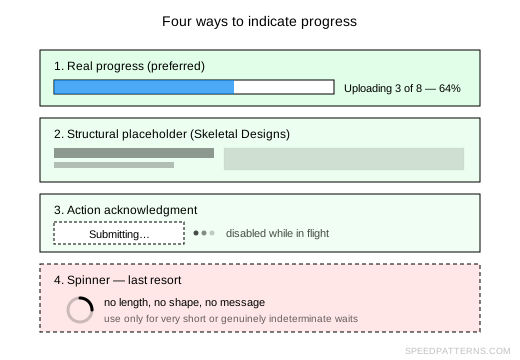
Pick the form of progress indication that matches what you actually know about the operation. There's a small ladder of options, ordered from most informative to least:
1. Real progress, when you have it
For uploads, downloads, multi-step forms, batch operations and any wait with measurable steps, show a determinate progress bar with percentage and, where possible, a description of the current step ("Uploading 3 of 8…"). This is the only place a literal progress indicator earns its space on the screen — it tells the user how long they're waiting and what's happening.
2. Structural placeholders
For loading content into a region of the page, use a Skeletal Design that mirrors the final layout. This communicates what the content will be, where it will appear, and how the page is structured — none of which a spinner can do. Skeletal placeholders are the right answer for feeds, lists, dashboards and article bodies.
3. Action acknowledgments
For discrete user actions (form submits, button clicks, link follows), acknowledge the action directly: disable the trigger, change its label to describe what's happening, and confirm completion when it lands. This is more informative than any generic indicator because it's tied to the specific control the user touched.
4. Motion-based bridging
For unavoidable view transitions, mask slowness with animation. A short, purposeful transition that takes the user from the old state toward the new one absorbs a meaningful amount of the wait and communicates direction.
5. Generic spinners — last resort
Plain circular or linear indeterminate spinners belong at the bottom of the ladder. They're acceptable in narrow cases — very short waits inside a single control, genuinely indeterminate background work — but should never be the default choice. See Don't Use Spinners for the full argument.
Why This Matters
The form of progress indication shapes how the wait feels, even when its length doesn't change. A skeletal placeholder that telegraphs the page structure feels faster than a spinner that telegraphs nothing — even when both end at the same moment. A "Submitting…" button feels reliable; a full-page overlay spinner feels like the site has frozen.
Treating the loading experience as a design problem with multiple specific solutions, rather than a hole to plug with a single stock animation, is what separates speed-aware products from the rest.
Guidelines
- Match the indicator to what you know. Determinate progress requires a known length; if you don't have one, don't fake it
- Indicate progress in place. Show the indicator on or next to the thing the user is waiting for, not in a distant overlay
- Don't stack indicators. A spinner on top of a skeletal placeholder on top of a progress bar communicates panic, not progress
- Hide the indicator the moment the wait ends. A spinner that lingers after content loads makes the page feel slower than it is
- Use indicators sparingly. The best progress indicator is no progress indicator — make the operation fast enough that one isn't needed
Related Patterns
- Skeletal Designs — structural placeholders that double as progress indication
- Acknowledge Actions — feedback for discrete user actions
- Masking Slowness With Animation — motion as a progress signal
- Don't Use Spinners — why the generic spinner is a poor default
Resources
- Mobile Design Details: Avoid The Spinner by Luke Wroblewski
- Response Times: The 3 Important Limits by Jakob Nielsen — the 0.1s / 1s / 10s thresholds that determine when progress indication is needed at all